BYOD and removable media in a CUI environment: the controls contractors miss

Bring your own device (BYOD) and removable media sit in the same uncomfortable spot for a defense contractor: both are convenient, both are everywhere, and both can quietly carry Controlled Unclassified Information (CUI) outside the boundary you drew in your System Security Plan (SSP). NIST Special Publication (SP) 800-171, which DFARS clause 252.204-7012 requires you to implement, has specific, checkable requirements for both, and they are among the most commonly unfinished items we see contractors wrestle with. This piece walks through what a BYOD security policy must cover in a CUI environment, what the removable media requirements actually say, and the specific gaps that show up again and again.
Why do personal devices expand your CUI boundary?
Because scope follows the data, not the purchase order. A device that processes, stores, or transmits CUI is in scope regardless of who owns it, and NIST SP 800-171 Rev 2 requirement 3.1.18 requires you to control the connection of mobile devices, personal or corporate. The moment an employee's personal phone syncs a mailbox that contains CUI, or a personal laptop opens a CUI attachment, your boundary has grown by one unmanaged device, and your SSP is describing an environment that no longer exists.
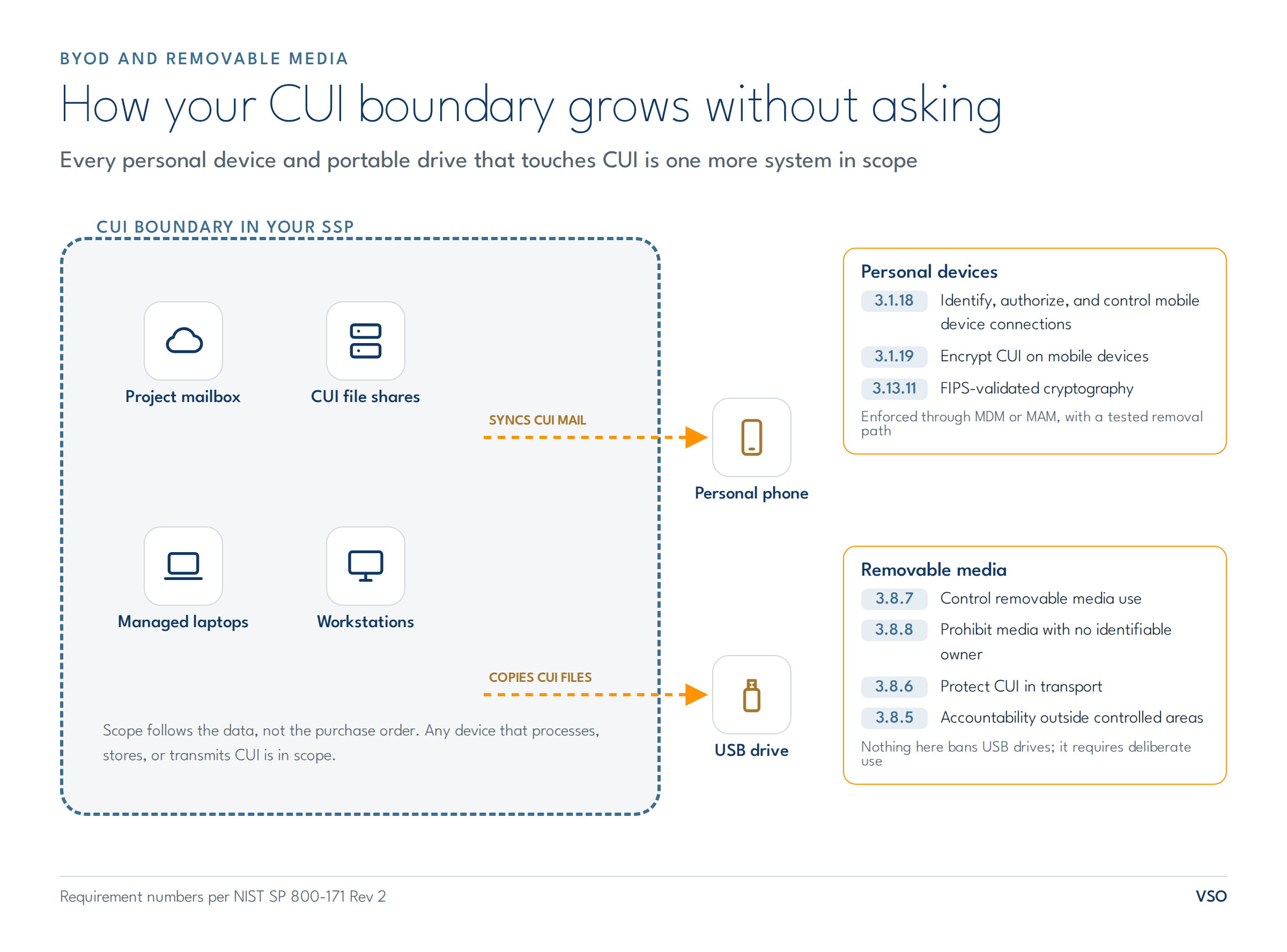
That is the real stake in a BYOD decision. It is not whether employees may read email on their phones; it is whether you can name every device where CUI can land, and enforce your controls on all of them.
What must a BYOD security policy cover in a CUI environment?
Four things make a BYOD security policy real rather than aspirational: an authorized device list, enforced enrollment, encryption that meets the standard, and a tested removal path. NIST SP 800-171 Rev 2 frames the first three directly. Requirement 3.1.18 expects mobile device connections to be identified, authorized, and controlled, and the CMMC Level 2 assessment guidance describes maintaining a list of devices permitted to handle CUI and configuring systems to accept connections only from them. Requirement 3.1.19 requires encrypting CUI on mobile devices and mobile computing platforms, and because that encryption protects CUI confidentiality, requirement 3.13.11 pulls it up to FIPS-validated cryptography, which is a specific validated configuration rather than a checkbox. In practice that combination means mobile device management (MDM) or mobile application management enforcing encryption, screen lock, and app boundaries before a personal device ever touches CUI, plus a wipe capability for the corporate container when the employee leaves. Identity controls, such as multi-factor authentication for CUI environments, work alongside these device controls.
The fourth item, the removal path, is the one policies skip: what happens to the CUI in a personal device's mail cache on the employee's last day, and who verifies it happened?
What does NIST 800-171 require for removable media?
The Media Protection family treats removable media as its own risk, with requirements that are short, blunt, and testable. Requirement 3.8.7 requires controlling the use of removable media on system components. Requirement 3.8.8 prohibits portable storage devices that have no identifiable owner outright. Requirement 3.8.6 requires cryptographic protection of CUI on digital media during transport unless physical safeguards do the job, and 3.8.5 requires accountability for media that leaves controlled areas. Requirement 3.1.21 adds the mirror image: limits on using your portable storage devices on external systems.
Notice what this list permits. Nothing in 800-171 bans USB drives. It demands that their use be deliberate: owned, controlled, encrypted in transport, and accounted for. The assessment guidance even sketches a workable model, with organization-issued drives checked out from IT for a specific purpose and returned when done.
Which controls do contractors actually miss?
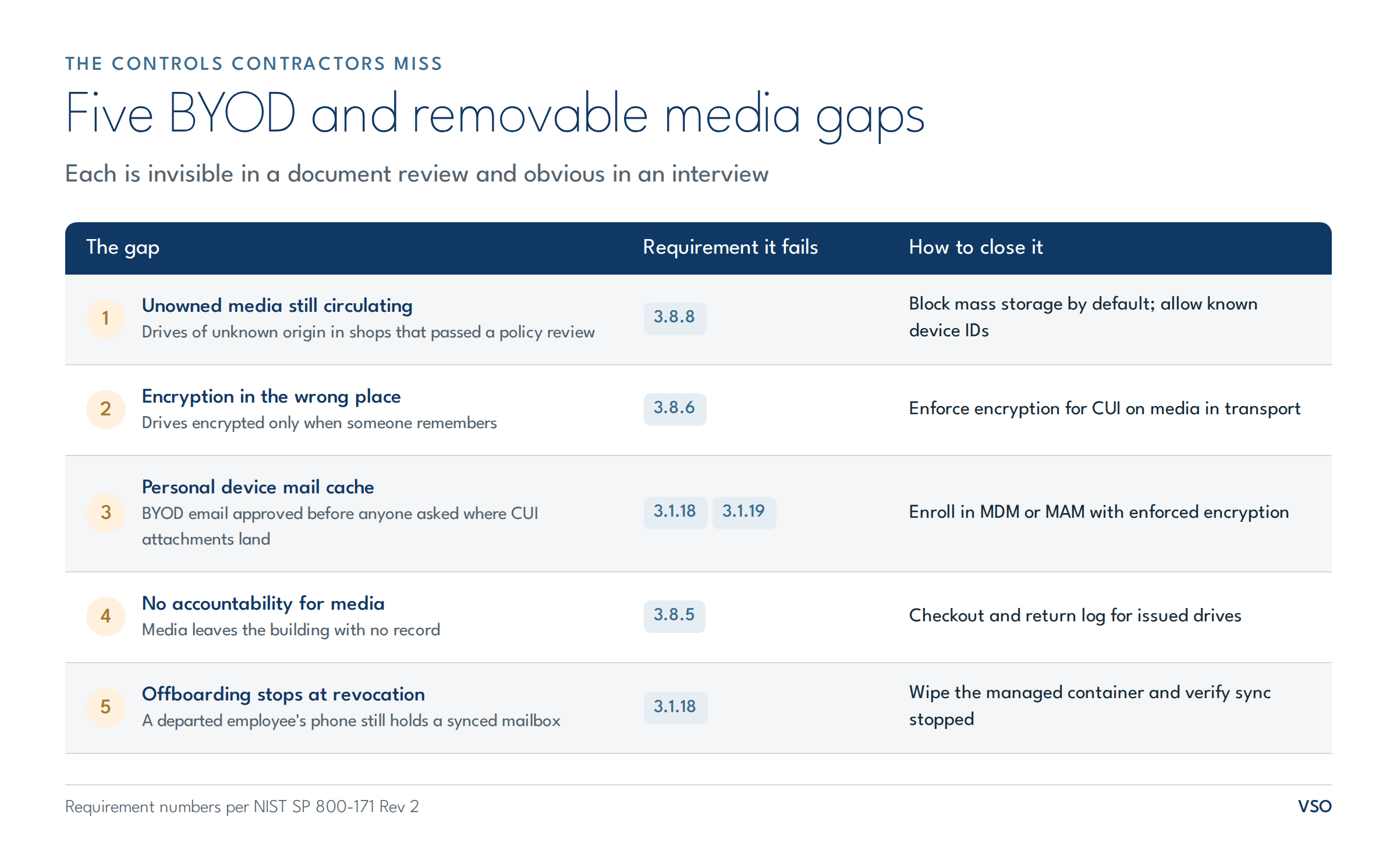
The same five gaps recur. First, the unowned media prohibition: 3.8.8 is close to free to implement (block mass storage by default, allow known device IDs), yet drives of unknown origin still circulate in shops that passed a policy review. Second, encryption in the wrong place: drives are encrypted when someone remembers, which fails 3.8.6 exactly when it matters. Third, the personal device mail cache: BYOD email approved years ago, before anyone asked where CUI attachments end up. Fourth, accountability: media leaves the building with no record, which turns an eventual lost drive into an unanswerable incident scoping question. Fifth, offboarding: the departed employee whose personal phone still holds a synced mailbox. Each gap is invisible in a document review and glaring in an interview, because assessors and primes ask the operational question: show me how you would know.
Is banning USB and BYOD the simpler answer?
For many contractors, partially, and 800-171 explicitly allows it. Complete prohibition of portable storage is a recognized implementation of the portable storage requirements, and it is easier to enforce and evidence than a permission model. The honest tradeoffs: engineering and manufacturing workflows that move data to machines and test rigs often genuinely need media, and a ban without a sanctioned alternative breeds shadow workarounds, which are worse than a controlled channel. A defensible middle: default-deny for removable media with a small set of owned, encrypted, logged exceptions, and corporate devices rather than BYOD wherever CUI is in play, reserving BYOD for roles that never touch it. Whatever you choose, write it down as the policy you enforce, not the policy you aspire to.
Conclusion
BYOD and removable media are where a CUI boundary is most often bigger than its SSP admits. The requirements are specific: control mobile device connections (3.1.18), encrypt CUI on them with FIPS-validated cryptography (3.1.19 with 3.13.11), control removable media (3.8.7), refuse unowned devices (3.8.8), and keep accountability when media travels (3.8.5, 3.8.6). The takeaway to act on this week: pull the list of devices authorized to touch CUI, compare it against what your mail platform and endpoints actually report, and treat every mismatch as your scoping backlog.
VSO's end user services team builds device programs for Defense Industrial Base contractors, from MDM enrollment to removable media enforcement. If your device list and your reality disagree, talk to us.
Contact us today at sales@vso-inc.com or visit our contact page to start the conversation.