MDM vs MAM: choosing a mobile management model when your data is controlled

Phones and tablets are where controlled data leaks quietly. An engineer opens a drawing in email on a personal phone, a program manager copies a paragraph from a proposal into a notes app, a contractor saves an attachment to personal cloud storage. The tool choice behind MDM vs MAM decides which of those actions your organization can prevent. This post compares mobile device management and mobile application management, explains what each can and cannot do, and gives a simple way to choose by device type.
What is the difference between MDM and MAM?
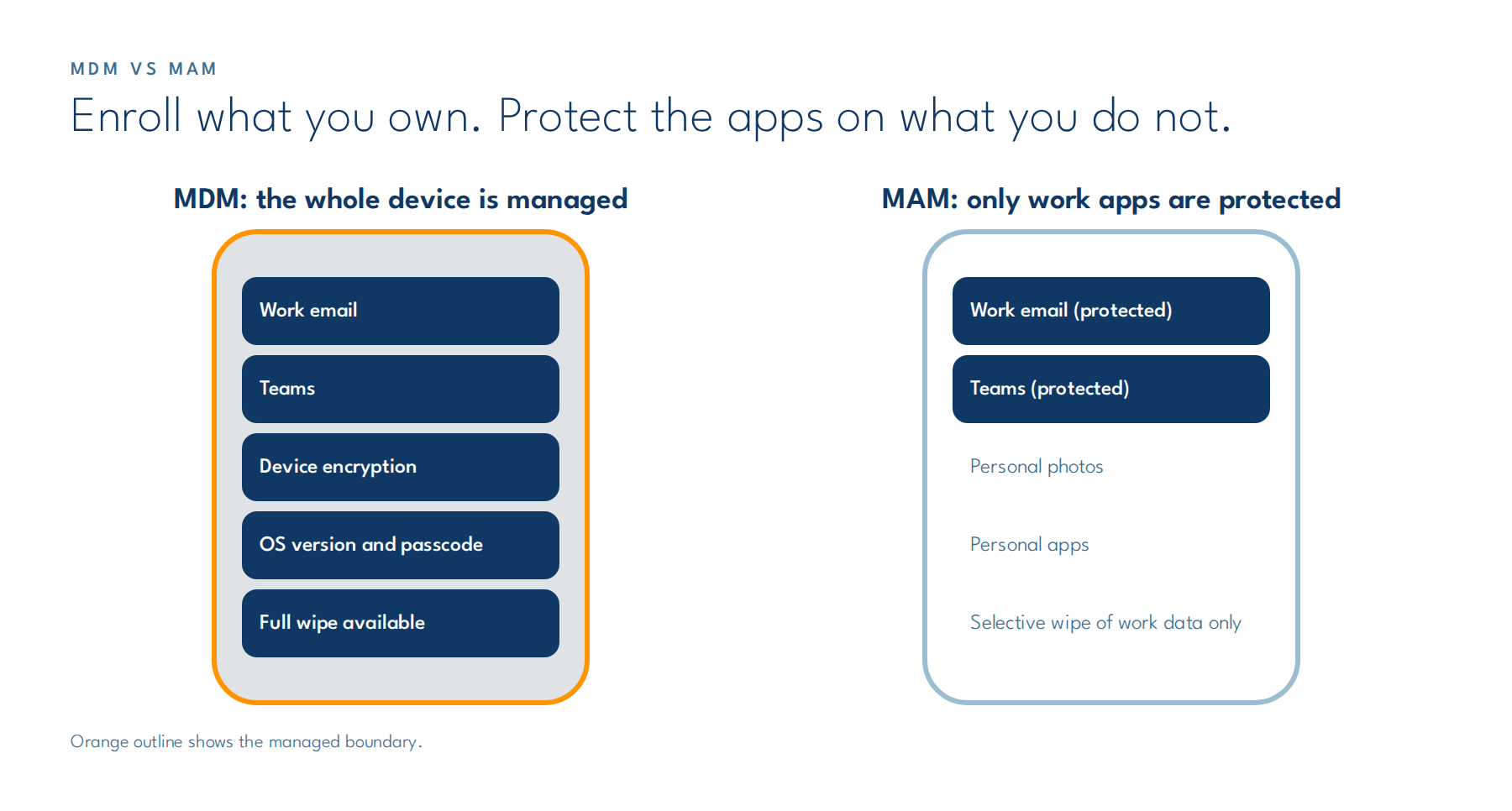
Mobile device management (MDM) enrolls the whole device and lets the organization control its settings, apps, and security posture. Mobile application management (MAM) manages only specific apps and the organizational data inside them, without enrolling the device. MDM governs the phone; MAM governs the work data on the phone.
Microsoft’s documentation for Intune app protection policies describes them as rules that “ensure an organization’s data remains safe or contained in a managed app,” and notes they can be used “independent of any mobile-device management (MDM) solution.” That independence is what makes MAM workable on personal devices, often called bring your own device (BYOD).
| MDM | MAM | |
| What is managed | The whole device | Selected apps and their data |
| Enrollment required | Yes | No |
| Typical owner of device | Organization | Employee (BYOD) or another MDM |
| Can enforce device encryption, OS version, passcode | Yes | Checks some conditions at app launch; does not configure the device |
| Can block copy and paste into personal apps | Yes, with app policies | Yes |
| Wipe scope | Full device or selective | Organizational app data only |
| User privacy concern | Higher | Lower |
What can MAM do on a personal phone?
MAM can keep organizational data inside approved apps on a personal phone. Typical app protection settings include requiring a PIN or biometric to open work apps, blocking copy and paste from work apps into personal apps, controlling where users can save work files, and blocking managed apps on jailbroken or rooted devices.
What MAM cannot do matters as much. Microsoft’s guidance on MAM for unenrolled devices states that MAM is not recommended as the only method for organization-owned devices, cannot manage shared or user-less devices such as kiosks, and works at the app level rather than the device level. It also cannot wipe the whole device, only the organizational data in managed apps.
When do you need full MDM enrollment?
You need MDM when the organization owns the device, when the device is shared, or when the data it handles requires device-level controls you must be able to prove. That usually includes phones and tablets issued to staff who handle Controlled Unclassified Information (CUI) or electronic protected health information (ePHI) as part of their core work.
Device-level evidence is the deciding factor in regulated environments. With MDM you can show that every enrolled device is encrypted, runs a supported operating system, has a passcode, and can be fully wiped. With MAM you can show that the work data is contained, but not what else is true about the device.
Consider an illustrative case: a field engineer loses a company tablet at an airport. Under MDM, IT confirms the tablet was encrypted, sees its last check-in, and issues a full wipe, and the incident record shows all three. Under MAM alone, IT can remove the work app data the next time the tablet connects, but cannot show whether the device was encrypted or whether files were saved outside the managed apps before it was lost.
How to choose between MDM and MAM for each device type
Choose by who owns the device and what data it touches, not by tool preference. Most organizations end up running both: MDM for company-owned devices and MAM for personal devices that need limited access.
A decision guide:
| Device | Data it touches | Recommended model |
| Company-owned phone or tablet | CUI, ePHI, or other regulated data | MDM plus app protection policies |
| Company-owned shared or kiosk device | Any | MDM only (MAM does not support user-less devices) |
| Personal phone | Email, chat, calendar, no regulated files | MAM with app protection policies |
| Personal phone | Regulated files | Usually not allowed; if allowed, MAM plus strict policy and conditional access, reviewed as an exception |
| Contractor or partner device managed by another MDM | Limited organizational data | MAM |
The fourth row is the one to decide deliberately. Many organizations simply keep regulated files off personal devices and enforce that with conditional access. Our post on conditional access policies in Microsoft 365 GCC High shows how that enforcement works in a Government Community Cloud High (GCC High) tenant. The policy side of personal devices, including removable media, is covered in our post on BYOD and removable media in a CUI environment.
Making the MDM vs MAM decision stick
The MDM vs MAM decision only holds if access rules enforce it. Pair each model with conditional access so that an unenrolled phone cannot reach systems meant for enrolled devices, and so that apps without protection policies cannot open work data at all. Review the device inventory monthly for devices that fall between the models.
Tell users plainly what each model can see. Employees accept MAM on personal phones more readily when they know the organization cannot read their personal messages or wipe their photos. A one-page explanation during onboarding prevents most of the pushback, and it reduces the number of people who quietly avoid enrollment by using a personal app instead.
VSO’s End User Services team designs and runs both models for clients, including enrollment, app protection policies, conditional access, and the reporting that shows which devices sit where.
MDM vs MAM is not an either-or choice for most regulated organizations. Enroll what you own, protect the apps on what you do not, and let conditional access keep the two separate.
Need a mobile management model that keeps regulated data where it belongs? Contact us today at sales@vso-inc.com or talk to VSO’s end user services team.